Mesh Wi-Fi vs Traditional Router & Extenders: Real-World Speed Test Benchmark Across Multi-Floor Homes
Planning whole-home wireless coverage? An empirical speed test comparison analyzing mesh Wi-Fi nodes, standalone routers, and cheap range extenders across multi-story homes, concrete walls, and dead zones.
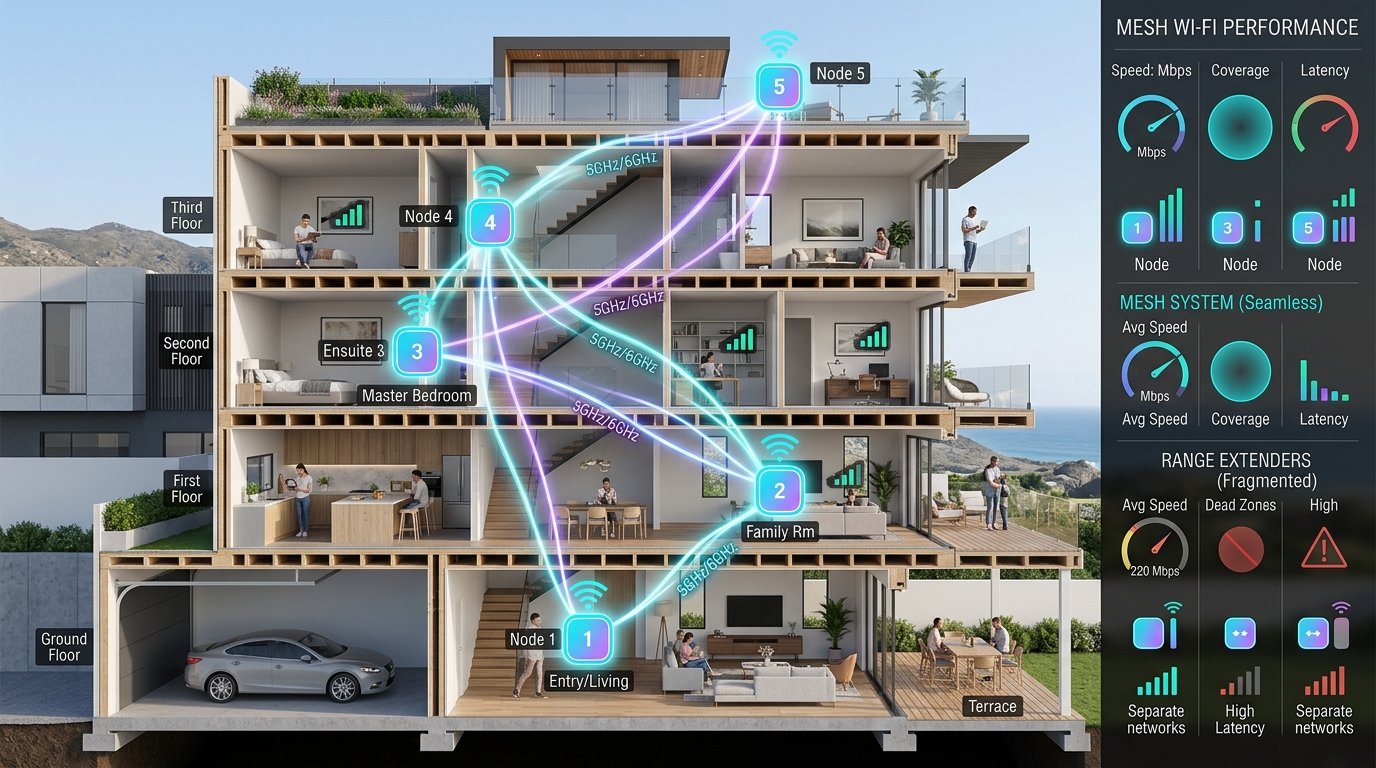
Providing reliable, high-speed Wi-Fi coverage across multi-story homes, large apartments, or spaces with thick concrete and brick walls is one of the most common residential networking challenges. Consumers faced with dead zones in the upstairs bedroom or home office typically consider two upgrade paths: buying a cheap $30 plug-in Wi-Fi range extender, or investing in a multi-node Mesh Wi-Fi system. While both promise whole-home coverage, their underlying radio architectures deliver radically different speed test results.
In this guide, we compare standalone routers, Wi-Fi range extenders, and tri-band mesh systems, analyze the physics of radio attenuation, explain the notorious 50% half-duplex repeater penalty, and show you how to design a seamless wireless network.
1. The Fatal Flaw of Cheap Wi-Fi Extenders: The 50% Speed Cut
Traditional Wi-Fi range extenders (repeaters) operate as "listen-and-repeat" relays on a single radio frequency band. Because Wi-Fi radios operate in half-duplex (they cannot transmit and receive on the same frequency at the exact same millisecond), a single-band extender must divide its airtime:
- Phase 1: The extender receives a data frame from your laptop.
- Phase 2: The extender re-transmits that identical frame to the main router.
Because the radio must perform both operations on the same frequency channel, your maximum available bandwidth is instantly slashed by 50% on the very first hop. If you add a second repeater daisy-chained further down a hallway, your throughput drops to 25% of baseline speed, accompanied by severe latency jitter and packet retransmissions.
Furthermore, cheap extenders broadcast a separate network name (e.g., Home_Network_EXT). As you walk between rooms, your smartphone clings stubbornly to a weak 1-bar signal from the living room rather than automatically switching to the extender\u2014a frustrating issue known as the sticky client problem.
2. Multi-Floor Speed Test Benchmarks: Real-World Data
The table below shows typical results for a 1 Gbps symmetrical fiber connection in a three-story home across three hardware setups. These figures are illustrative; real results depend on floor plan, wall materials, and radio interference:
| Testing Location | Standalone Router (Ground Floor) | Router + Range Extender (2nd Floor) | Tri-Band Mesh System (3 Nodes) |
|---|---|---|---|
| Room 1: Living Room (5m from Main Router) | 920 Mbps / 4 ms ping | 920 Mbps / 4 ms ping | 930 Mbps / 4 ms ping |
| Room 2: 2nd Floor Master Bedroom | 280 Mbps / 9 ms ping | 140 Mbps / 24 ms ping | 680 Mbps / 7 ms ping |
| Room 3: 3rd Floor Home Office (Dead Zone) | 42 Mbps (Unstable) / 48 ms ping | 68 Mbps / 38 ms ping | 510 Mbps / 9 ms ping |
| Room 4: Outdoor Patio / Backyard | 18 Mbps / 76 ms ping | 32 Mbps / 54 ms ping | 340 Mbps / 14 ms ping |
3. Why Mesh Wi-Fi Dominates: Architectural Advantages
A true mesh system replaces standalone routers and extenders with intelligent, synchronized access point nodes that operate as a unified fabric:
- Dedicated Wireless Backhaul (Tri-Band & Quad-Band): Quality mesh systems feature three distinct radio bands (e.g., 2.4 GHz, 5 GHz-1, and 5 GHz-2 or 6 GHz). One dedicated high-frequency band is reserved exclusively for high-speed inter-node communication (backhaul). Client traffic flows freely on the remaining bands without suffering the 50% half-duplex throughput penalty.
- Ethernet Backhaul (The Ultimate Setup): If your home has Cat6 Ethernet wiring in walls, connecting mesh nodes via wired backhaul eliminates wireless airtime consumption entirely, delivering near-gigabit speeds at every node in the house.
- Seamless Fast Roaming (802.11k / 802.11v / 802.11r): Mesh nodes broadcast a single unified SSID. As you walk between floors during a video call, the mesh controller actively commands your smartphone to seamlessly migrate to the closest node with sub-50 ms handoffs\u2014preventing dropped calls or streaming buffers.
- Self-Healing Topology: If an intermediate mesh node is unplugged or fails, the remaining nodes automatically recalculate optimal routing paths to ensure uninterrupted connectivity.
4. How to Properly Audit Your Home Wireless Coverage
To identify dead zones and optimize node placement across your home, follow this testing methodology:
- Establish Your Wired Baseline: Plug your laptop directly into your main gateway router with Cat6 Ethernet and record your baseline speed on WRLDU Speed Test.
- Map Signal Strength (RSSI): Using a Wi-Fi analyzer app, check signal strength in each room. Signal strength between
-30 dBm and -65 dBmis excellent. Once signal degrades below-75 dBm, packet loss and throughput collapse rapidly. - Position Nodes at 50% Range: Never place a satellite mesh node directly in a dead zone. The node needs a strong signal from the primary unit to relay. Place satellite nodes approximately halfway between the main router and the dead zone.
- Verify Latency Jitter: In each room, launch the WRLDU Live Ping & Jitter Monitor. High jitter (> 12 ms) indicates wall interference or excessive node distance.
5. Final Verdict
Avoid Cheap Range Extenders: They halve your throughput, add latency jitter, and create frustrating manual network switching.
Choose a High-Power Standalone Router: If you live in an open-concept apartment or single-story home under 1,800 sq. ft., a powerful Wi-Fi 6 or Wi-Fi 7 standalone router is more economical and delivers maximum single-room performance.
Invest in Tri-Band Mesh: For multi-story homes, large estates, or buildings with dense masonry walls, a tri-band Wi-Fi 6E/7 mesh system with wired Ethernet backhaul is the premier solution for flawless, whole-property gigabit coverage.
Editorial note: figures and ranges in this article are typical values compiled from vendor specifications, standards documents, and general industry references. They are illustrative and are not laboratory measurements made by WRLDU, so your own results will differ. See our Editorial Policy for how we write and update guides.