Best Wi-Fi Channels for 5 GHz and 2.4 GHz in 2026: How to Stop Interference and Double Your Speed
Is your neighbor's Wi-Fi choking your internet speed? A practical RF engineering guide detailing how to choose non-overlapping 20/40/80/160 MHz channels on 2.4 GHz and 5 GHz, avoid DFS radar drops, and maximize wireless throughput.
If your internet speed drops dramatically when moving just a few rooms away from your router—or if your connection experiences sudden ping spikes and frame drops during the evening—the problem is rarely your ISP fiber line. In apartment complexes, dense suburban neighborhoods, and multi-device households, radio frequency (RF) channel interference is the single most common cause of degraded Wi-Fi performance.
Most consumer routers are configured out-of-the-box with their channel selection set to "Auto". Unfortunately, basic auto-selection algorithms simply pick whatever channel looks quietest during an initial 3:00 AM reboot. When all your neighbors' routers do the exact same thing, channels become heavily congested. In this RF engineering guide, we break down the mathematics of non-overlapping channels on 2.4 GHz and 5 GHz bands and show you exactly how to calibrate your router for maximum speed and rock-solid stability.
1. The 2.4 GHz Band: The Golden Rule of 1, 6, and 11
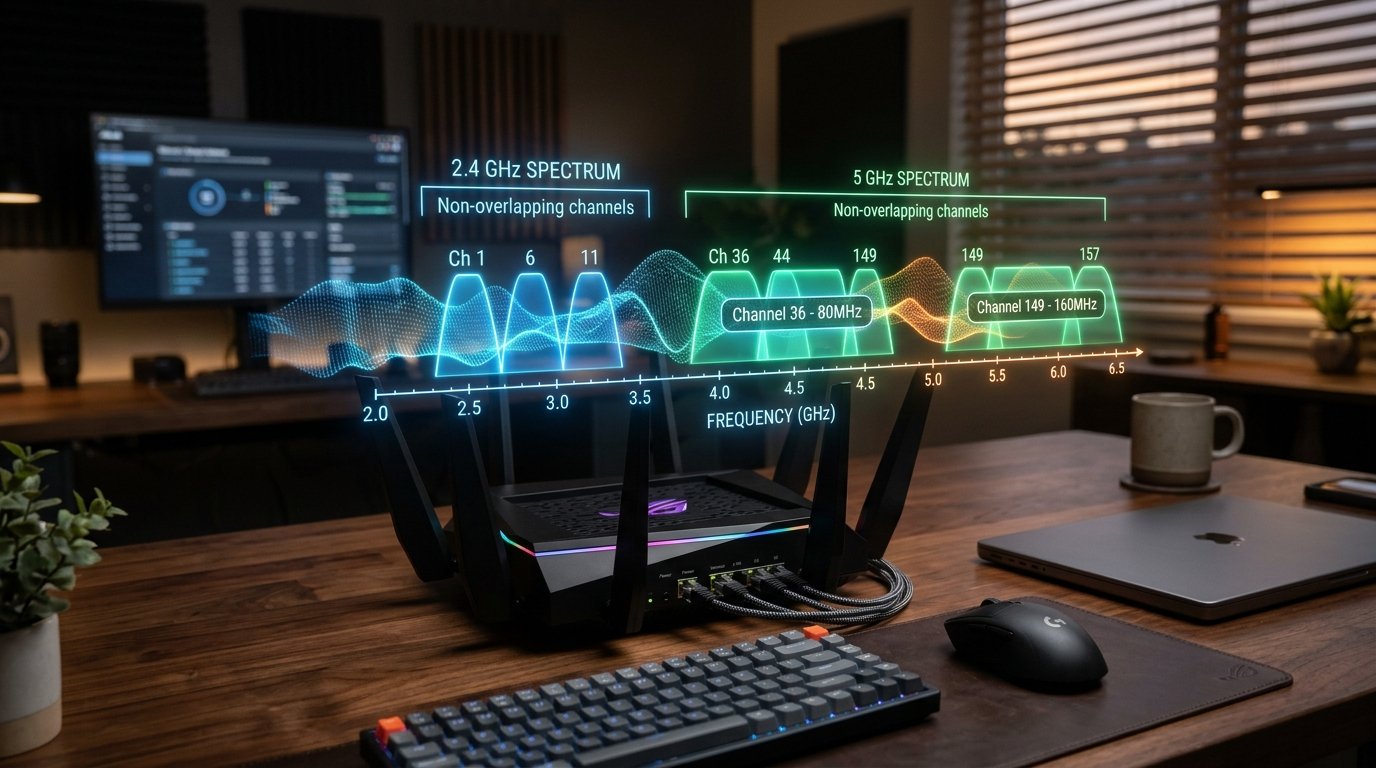
The 2.4 GHz spectrum spans from 2400 MHz to 2483.5 MHz, divided into 11 channels (in North America) or 13 channels (in Europe and Asia). Crucially, each standard 20 MHz Wi-Fi channel bleeds 10 MHz of spectral energy into neighboring frequencies on both sides.
| 2.4 GHz Channel | Center Frequency | Overlapping Interference Status | Recommended Use |
|---|---|---|---|
| Channel 1 | 2412 MHz | Non-Overlapping (with 6 & 11) | Primary Recommended |
| Channels 2, 3, 4, 5 | 2417 – 2432 MHz | Co-Channel Interference with Ch 1 & 6 | Never Use (Causes severe packet drops) |
| Channel 6 | 2437 MHz | Non-Overlapping (with 1 & 11) | Primary Recommended |
| Channels 7, 8, 9, 10 | 2442 – 2457 MHz | Co-Channel Interference with Ch 6 & 11 | Never Use |
| Channel 11 | 2462 MHz | Non-Overlapping (with 1 & 6) | Primary Recommended |
Crucial Rule: Never set 2.4 GHz channel width to 40 MHz in residential areas. A 40 MHz channel consumes over 80% of the entire 2.4 GHz spectrum, ensuring severe collision with smart home IoT devices, Bluetooth peripherals, and microwave ovens.
2. The 5 GHz Spectrum: UNII-1, UNII-2 (DFS), and UNII-3 Explained
The 5 GHz spectrum offers vastly more bandwidth, allowing channels to bond together into 40 MHz, 80 MHz, and 160 MHz ultra-wide channels. However, the 5 GHz band is split into distinct regulatory tiers:
- UNII-1 (Channels 36, 40, 44, 48): The cleanest, universally supported consumer band. Completely immune to radar interference. Ideal for 80 MHz bonding (Channel 36 + 40 + 44 + 48 = 80 MHz). Perfect for gaming battlestations and 4K streaming.
- UNII-2 / UNII-2e DFS (Channels 52 to 144): Dynamic Frequency Selection (DFS) channels. These frequencies are shared with weather radar, airport navigation systems, and military telemetry. If your router detects a radar pulse on a DFS channel, it is legally mandated to immediately disconnect all Wi-Fi clients and jump to another frequency for 30 minutes! Avoid DFS if you live within 15 miles of an airport.
- UNII-3 (Channels 149, 153, 157, 161, 165): High-power transmission band. Allows higher transmit wattage (1 Watt EIRP) for superior wall penetration and long-range multi-room coverage.
3. Step-by-Step Channel Calibration Checklist
- Scan Your Wireless Environment: Download a free Wi-Fi analyzer (such as Wi-Fi Analyzer on Android, WiFiInfoView on Windows, or Wireless Diagnostics via Option+Click Wi-Fi on macOS) to visualize which channels your neighbors occupy.
- Set 2.4 GHz to 20 MHz Only: Lock your 2.4 GHz radio to whichever of Channels 1, 6, or 11 has the lowest co-channel interference.
- Set 5 GHz to 80 MHz (Channel 36 or 149): For 99% of gigabit broadband homes, 80 MHz width delivers 650 Mbps to 900 Mbps real-world throughput with zero radar drops.
- Verify Speed & Latency: Run our WRLDU Unthrottled Speed Test before and after switching channels to measure throughput gains and reduced packet jitter.
Editorial note: regulatory channel availability varies by country (FCC in USA, ETSI in Europe, TELEC in Japan). Always adhere to local telecommunications regulations. See our Editorial Policy for testing standards.